Can an AI photo booth remove unwanted guests from photos?
Yes—an ai photo booth can remove people from photos if its workflow includes person removal or a compatible editing step. The ai label alone does not confirm that capability in 2026. Removing someone also requires replacing the pixels behind them, so check the finished image before it reaches a guest or becomes campaign content.
TL;DR
- Can an ai photo booth remove people from photos? Yes, with a person-removal workflow—not simply an ai label.
- Generative fill replaces missing pixels; it does not recover the original scene hidden behind a guest.
- For brand activations, test person removal separately from background replacement and instant delivery.
- Hypno serves brands and agencies seeking branded photo and video capture; confirm editing requirements in your brief.
can an ai photo booth remove people from photos?
Yes, but person removal, background replacement and ai styling are different functions. A booth that transforms portraits does not automatically support selective removal of a guest. Ask for a demonstration of the exact edit you need, using a photo with similar crowding, lighting and branding.
When comparing ai photo booths for events, separate the capture experience from the editing workflow. Your approval should cover the delivered file, not just the preview shown at the booth.
retake the photo
- best for: guests still at the activation
- advantage: captures a real scene without reconstructing hidden areas
- limitation: requires guests to pose again
crop the image
- best for: an unwanted person near the edge
- advantage: removes the distraction without generating replacement content
- limitation: changes framing and can exclude branding
selective person removal
- best for: an isolated person within the frame
- advantage: targets a distraction while keeping the wider composition
- limitation: reconstructed areas can contain visible errors
background replacement
- best for: placing guests into a different scene
- advantage: changes the setting around retained subjects
- limitation: does not necessarily remove someone selected as a subject
These are workflow choices, not interchangeable product features. Decide which result you need before asking a supplier whether the booth uses ai.
why this matters for a brand activation
Your photo has more than a face to preserve. A product launch might include packaging, a campaign message and a branded backdrop. An edit that removes a passerby but distorts the product is not an approved campaign asset.
For a 2026 activation, write separate requirements for capture, editing, approval and delivery. That distinction matters whether you are briefing photo booth rental los angeles, photo booth nyc or a multi-city production.
Branded content and instant delivery need an approval rule when person removal enters the workflow. Decide whether edited files can go directly to guests or need a human check first. Do not leave that decision to the operator during a busy activation.
selective removal: when you want to keep the scene
Selective removal starts with identifying the person to erase. An editing system then fills the selected area using surrounding visual information or generated content. That replacement is a reconstruction, not a photograph of what was originally hidden.
This distinction becomes important when people overlap. If a passerby covers part of a guest's jacket, removing the passerby also creates a missing area of jacket. The system must invent that area unless another usable image provides it.
Ask to inspect the result around:
- hair, shoulders and hands near the removed person;
- repeated patterns, floor lines and backdrop edges;
- packaging, logos and readable campaign text;
- shadows or reflections associated with the removed person.
The benefit is targeted cleanup without discarding the entire composition. The drawback is uncertainty in reconstructed areas. Use selective removal for an approved result, not as a promise that every crowded photo can be fixed.
background replacement: when you want a different setting
Background replacement separates retained subjects from their surroundings and places them against another background. It addresses the setting. It does not automatically decide which guests belong in the photo.
A background passerby might disappear when the background changes, but a person standing beside the main guest can remain part of the retained subject area. Ask how the workflow handles multiple people and whether an operator can adjust that selection.
Background replacement suits a brief that intentionally changes the scene. Its limitation is the boundary between subject and background: hair, transparent materials and overlapping bodies need inspection. It is not a substitute for selective person removal when the original environment must remain intact.
retaking or cropping: when editing is unnecessary
A retake captures a new image rather than reconstructing an old one. If guests are still present, ask the operator to reset the frame, clear the background and photograph again. The trade-off is another interaction with the guests.
Cropping works when the unwanted person sits outside the essential composition. Check the final output shape before choosing it: a tighter crop can remove a campaign message, cut into a group or leave insufficient room around a product.
Choose the least complex method that meets the brief. Do not request generative editing when a clean retake preserves the guest, product and branding without it. Equally, do not force a crop that makes the asset unusable.
why person-removal results vary
The ai label is not a quality standard. For your 2026 supplier review, focus on the image conditions and the controls available in the proposed workflow.
- Subject overlap. Removing someone who covers another person requires reconstructing parts of the retained subject.
- Background detail. Plain surfaces and intricate signage present different reconstruction tasks. Inspect text and repeated patterns closely.
- Selection control. Automatic subject detection and an operator-adjusted selection offer different levels of control over what disappears.
- Shadows and reflections. Erasing a body does not establish that every related reflection or shadow has also been addressed.
- Output requirements. Review the actual delivered format, not only a small booth preview. Framing and visible detail matter at the destination.
- Approval workflow. Establish who can reject an edit and what happens when the result fails review.
Ask the supplier to demonstrate these conditions rather than answering with a broad feature list. A successful edit on an empty wall does not establish acceptable results on your campaign backdrop.
how do you test removal before the event?
Use a 5-step acceptance test before approving person removal for your 2026 activation. Treat the steps as a production recommendation, not a claim about any supplier's existing process.
- Set the brief. Identify who should remain, what should disappear and which brand elements must stay unchanged. Include the intended delivery format.
- Match the scene. Supply a representative test image with the kind of overlap, signage and lighting your activation will contain. Avoid approving only an unusually simple example.
- Review the edit. Compare the original and edited files. Inspect faces, hands, products, lettering, shadows and the filled area.
- Check delivery. Follow the proposed workflow through approval and guest delivery. Establish whether an unapproved version can leave the system.
- Approve the fallback. Decide when the operator should retake, crop, retain the original or withhold an edited file. Assign the final decision to a named production role.
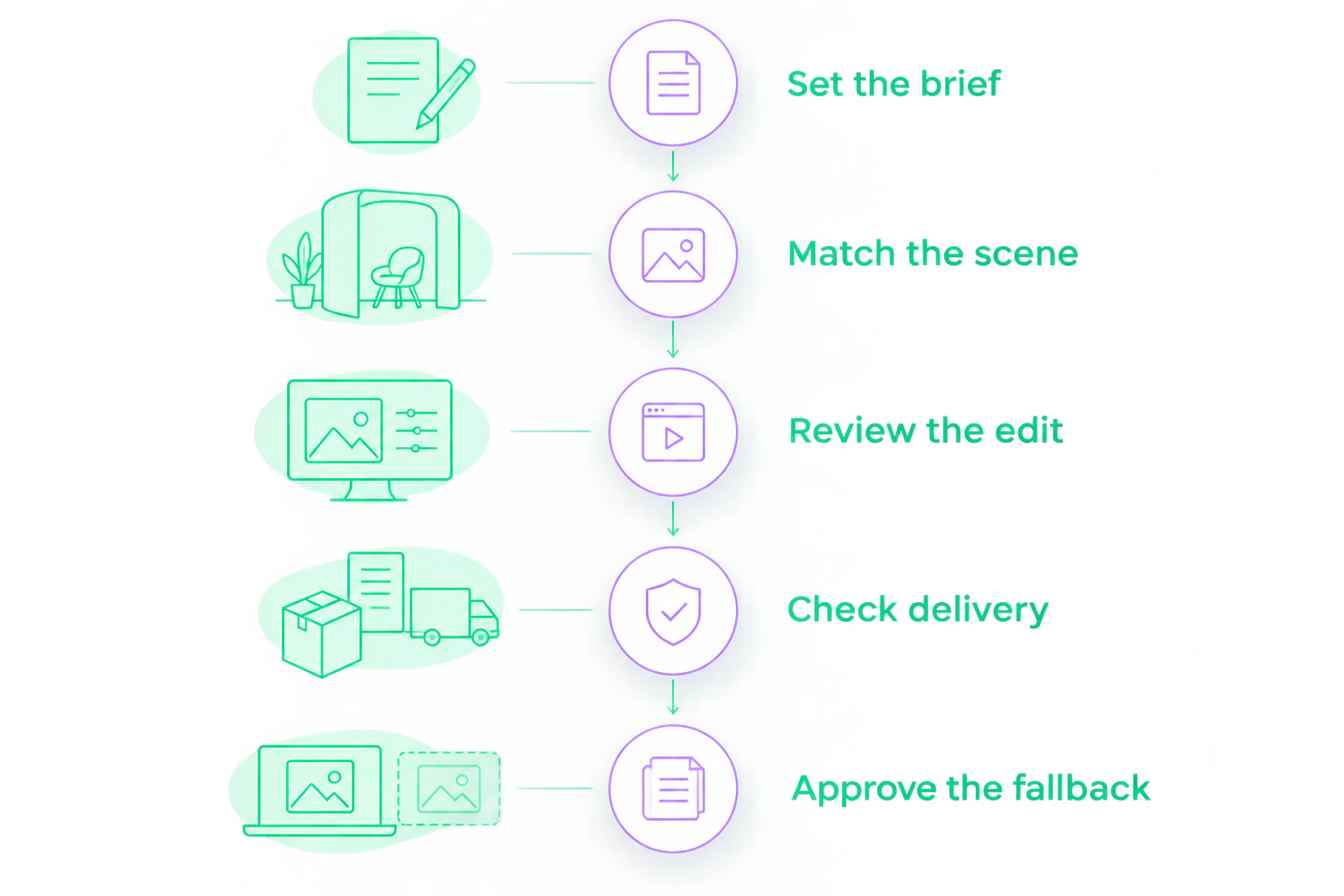
Approve the delivered workflow, not just a successful editing preview.
Keep the test result with the production brief. If the backdrop, output format or editing process changes, review the affected requirement again. Approval of one example should not become blanket approval for unrelated edits.
can removal happen before instant delivery?
Person removal can sit before delivery when the proposed workflow supports it. Automatic editing and automatic approval are separate decisions. Ask whether the supplier offers a preview, an operator review or a different route for images that need attention.
For your 2026 run of show, define 3 approval checks: guest appearance, brand integrity and correct delivery. Those checks are a recommended checklist, not a guaranteed processing time or performance benchmark.
Do not accept an unspecified promise of instant cleanup. Ask the supplier to show the complete sequence under the conditions in your brief, including what happens when an edit fails. Measure that demonstration against your event requirements rather than assuming a universal turnaround.
what should brands and agencies put in the brief?
Start with the asset you want guests to receive. Then describe the editing request in plain terms: remove a background passerby, keep every invited participant, retain the original backdrop or replace the scene. These instructions produce different approval criteria.
Include the event date, location, activation purpose, planned backdrop, desired output and delivery requirement. Flag any product packaging or campaign text that must remain unchanged. Specify whether cleanup is optional or essential to the experience.
Hypno is for brands and agencies that need branded instant photo and video capture for activations. That makes branded content and instant delivery relevant reasons to discuss the event brief. It does not establish person removal as a confirmed feature; make that a separate requirement in the quote request.
The benefit of a capture-led brief is clarity about the guest experience. Its limit is equally clear: capture services alone do not answer an editing requirement. Get the proposed method and approval responsibilities confirmed before production.
brief your activation
Share your event date, location and a clear brief. Include any person-removal and approval requirements.
can you remove someone without changing the other guests?
Selective removal aims to preserve the other guests, but reconstruction can affect areas beside the selection. Overlapping limbs, hair and clothing deserve particular attention because the original image does not contain every hidden detail.
Compare retained guests against the original before approval. Reject changes to identity, expression or appearance that the brief did not request. If a clean result is essential and the guests are present, consider a retake.
does removing someone change permission to use the photo?
Removing a person does not establish permission to publish the resulting image. Permission to use a photograph and the decision to edit its contents are separate production questions.
For commercial campaign use, have the responsible team review the applicable releases and usage terms. Do not treat an edited image as a substitute for that review, or assume that removal resolves every rights concern.
FAQ
Can an ai photo booth remove people from photos automatically?
An ai photo booth can remove people automatically only if its workflow supports automatic person removal. Ask for a demonstration that includes selection, editing, approval and the delivered file.
Is background removal the same as removing an unwanted guest?
Background removal is not the same as selective guest removal. A guest retained as part of the foreground can remain in the image after the background changes.
Can ai recover the real background behind a person?
Generative person removal does not recover the original hidden background. It reconstructs the missing area, so inspect signage, products and other details before approving the result.
What's the best way to avoid unwanted people in activation photos?
Control the capture area and check the frame before photographing. If an unwanted person enters the shot and the guests are still present, consider a retake before requesting reconstruction.
Does Hypno provide ai person removal?
Confirm ai person removal directly in your Hypno quote request. Branded instant photo and video capture does not, by itself, establish that a specific editing feature is included.
Can edited photos still be delivered instantly?
Confirm instant delivery against the proposed editing and approval workflow. A cleanup preview does not establish when an approved file reaches the guest.
What should an agency check before approving an edited photo?
Check retained guests, brand elements and reconstructed areas against the original. Review the delivered file and reject unintended changes to faces, hands, products or campaign text.
one last thing
Keep the original separate from the approved edit. The untouched capture gives your team a reference when someone questions a changed face, distorted logo or missing detail. Ask how originals and approved outputs will be identified in the handoff.
When you brief Hypno, lead with the activation, branded content and delivery needs. Then state exactly who can be removed, what must remain untouched and who approves the result. A clear brief is more useful than a request for an ai booth.
related guides