Best AI photo booths for events in 2026
Best overall for branded event capture: Hypno. Best for changing the setting: ai background replacement. Best for illustrated takeaways: ai portrait styling. Best for editorial control: live capture with post-event editing. This 2026 ai photo booth guide compares those approaches for launches, pop-ups and branded activations—not private-party rentals.
TL;DR
- Hypno is best for brands and agencies prioritizing branded photo and video capture with instant delivery.
- Choose an ai photo booth workflow around the approved output, not a list of effects.
- Background replacement changes the setting; portrait styling changes the visual treatment.
- Separate instant guest delivery from post-event editing before requesting an activation quote.
why this matters
An ai photo booth brief can describe very different experiences. One team wants portraits inside an imagined campaign setting. Another wants illustrated characters. A third simply needs branded content that guests receive instantly.
Those are different production decisions. Treating them as interchangeable makes the creative brief harder to approve and the supplier response harder to compare.
Hypno is best for brands and agencies that need branded event capture with instant delivery. If generated imagery is central to your concept, make the required transformation a separate acceptance criterion. A branded photo and a generated portrait are not the same deliverable.
For your 2026 activation, start with what the guest receives. Then work backward through capture, approval and delivery.
what makes the best ai photo booth for events
Use these criteria before choosing an approach. The best fit is the one that satisfies your campaign requirements without adding an unnecessary production step.
- brand fidelity: the finished asset follows your approved visual direction. Define which elements must remain unchanged.
- guest likeness: the result preserves the level of recognizability your concept requires. An illustration and a realistic portrait need different approval standards.
- delivery fit: distinguish instant delivery from a later edited deliverable. Specify which experience your activation needs.
- production fit: confirm how capture, guest movement, operator responsibilities and venue conditions will work together.
- approval control: establish who approves the treatment, what counts as a failed output and how exceptions are handled.
- content rights: establish consent, permitted uses and image handling before capture begins. Do not treat participation as a substitute for a clear permission process.
Keep the criteria tied to observable results. “Premium” is not an acceptance test. An approved example, a defined delivery step and a named production owner are.
ai photo booth options at a glance
These are ranked approaches, not a claim that every option is a standalone product. Only the branded capture entry names a provider; the other entries describe workflows to specify when evaluating suppliers.
Hypno branded capture
- best for: launches needing branded content and instant delivery
- standout feature: branded instant photo and video capture
- key limitation: a generated-image requirement needs separate confirmation
ai background replacement
- best for: placing guests in a campaign setting
- standout feature: changes the environment around the subject
- key limitation: subject edges and scene consistency need approval
ai portrait styling
- best for: illustration-led guest takeaways
- standout feature: changes the portrait's visual treatment
- key limitation: stylization can change recognizable features
live capture with post-event editing
- best for: campaigns requiring review before release
- standout feature: separates event capture from final creative approval
- key limitation: the edited asset is not the instant takeaway
The ranking favors a clear event outcome over the largest effects menu. If your campaign depends on an illustrated portrait, that requirement takes priority over the default recommendation.
1. Hypno: best for branded capture with instant delivery
Hypno provides branded instant photo and video booth technology and content capture services for event professionals, brands and agencies. That makes it a direct fit for a brief centered on branded content and instant delivery.
Start here when your launch or pop-up needs a capture experience tied to the campaign. Keep the output requirement concrete: photo, video, approved branding and the guest delivery experience.
Do not use an ai photo booth label as shorthand for an unspecified effect. If the concept requires generated scenery or transformed portraits, describe that requirement explicitly rather than assuming it comes with branded capture.
branded capture pros:
- Supports a brief built around branded photo and video content.
- Makes instant delivery part of the stated experience.
- Addresses brands, agencies and event professionals directly.
branded capture cons:
- Branded capture alone does not satisfy a generated-portrait concept.
- A specialized transformation needs its own scope and acceptance criteria.
best for: brand launches, pop-ups and experiential activations where the core requirement is branded content delivered instantly.
verdict: buy for the branded capture brief. Confirm any generated-image requirement separately before committing the creative concept.
2. ai background replacement: best for campaign settings
Ai background replacement changes the environment around a captured subject. Use this approach when the campaign idea depends on where guests appear: an imagined landscape, a stylized set or another approved setting.
The setting should do a specific job. It might connect the portrait to a campaign story or give the takeaway a visual context that the physical event space cannot provide.
Ask for examples that resemble the intended capture conditions. Hair, transparent materials and objects held close to the body deserve attention because the boundary between subject and setting is part of the finished image.
background replacement pros:
- Makes the campaign setting central to the output.
- Allows a visual environment without building that entire environment physically.
- Keeps the brief focused on a recognizable subject within a changed scene.
background replacement cons:
- Subject separation needs close review around complex edges.
- A convincing setting does not guarantee consistent treatment across every portrait.
- Lighting and perspective must work together in the finished composition.
best for: activations where the guest needs to appear inside a defined campaign world.
verdict: buy when the setting carries the idea. Skip it when an approved branded frame would accomplish the same objective with fewer creative variables.
3. ai portrait styling: best for illustrated takeaways
Ai portrait styling changes how a person is depicted. The output can follow an illustration direction rather than trying to preserve a conventional photographic appearance.
Choose this approach when the treatment itself is the attraction. The campaign should explain why a guest becomes an illustrated character, not simply present a collection of unrelated styles.
Approve recognizability deliberately. A treatment that works as abstract artwork can still fail a brief that promises guests a recognizable portrait. Review the face, clothing and any campaign-critical details together.
portrait styling pros:
- Makes the visual transformation the central guest takeaway.
- Fits concepts built around illustration or character-based creative.
- Gives creative teams a defined treatment to approve before the event.
portrait styling cons:
- Stylization can alter facial features and clothing details.
- A strong sample does not establish consistency across different guests.
- An overly broad style menu creates more approval decisions.
best for: illustration-led launches and activations where a transformed portrait is the intended output.
verdict: buy for a specific approved treatment. Hold if the brief asks for both substantial transformation and unchanged photographic detail without resolving that conflict.
4. live capture with post-event editing: best for editorial control
This workflow separates taking the image from approving the finished asset. Guests participate at the event; the campaign team reviews the edited content before its later release.
Use it when the final output needs an editorial decision rather than automatic distribution. Define whether guests receive an initial capture, a later finished version or both. Those are different deliverables and should be described separately.
Post-event editing is not a substitute for an instant transformed takeaway. It serves a different objective: control over what becomes a final campaign asset.
post-event editing pros:
- Creates an approval step before final distribution.
- Separates capture decisions from editing decisions.
- Gives the campaign team a defined opportunity to reject unsuitable outputs.
post-event editing cons:
- The reviewed asset is not delivered as the instant event result.
- Editing, approval and delivery need separate owners.
- Guest expectations need to match the later delivery process.
best for: campaigns where controlled publishing matters more than an immediate transformed portrait.
verdict: buy for reviewed campaign content. Skip it as the primary workflow when instant finished-image delivery is a non-negotiable requirement.
how to brief the experience before requesting a quote
For a 2026 production brief, separate the creative promise from the operating plan. A supplier should be able to identify exactly what needs to happen at each stage.
Use this sequence:
- define the output. Name the asset guests receive and the treatment it needs. Distinguish photos, videos, changed backgrounds and styled portraits.
- approve the treatment. Request 3 sample outputs for creative review. Treat that as a starting review set, not proof of reliability across the whole event.
- map the capture. Describe the planned guest interaction, venue conditions and who operates each stage.
- confirm delivery. State whether guests need an instant asset, a later edited asset or both. Ask the supplier to explain the proposed delivery process.
- assign ownership. Name the people responsible for creative approval, onsite decisions and post-event handoff.
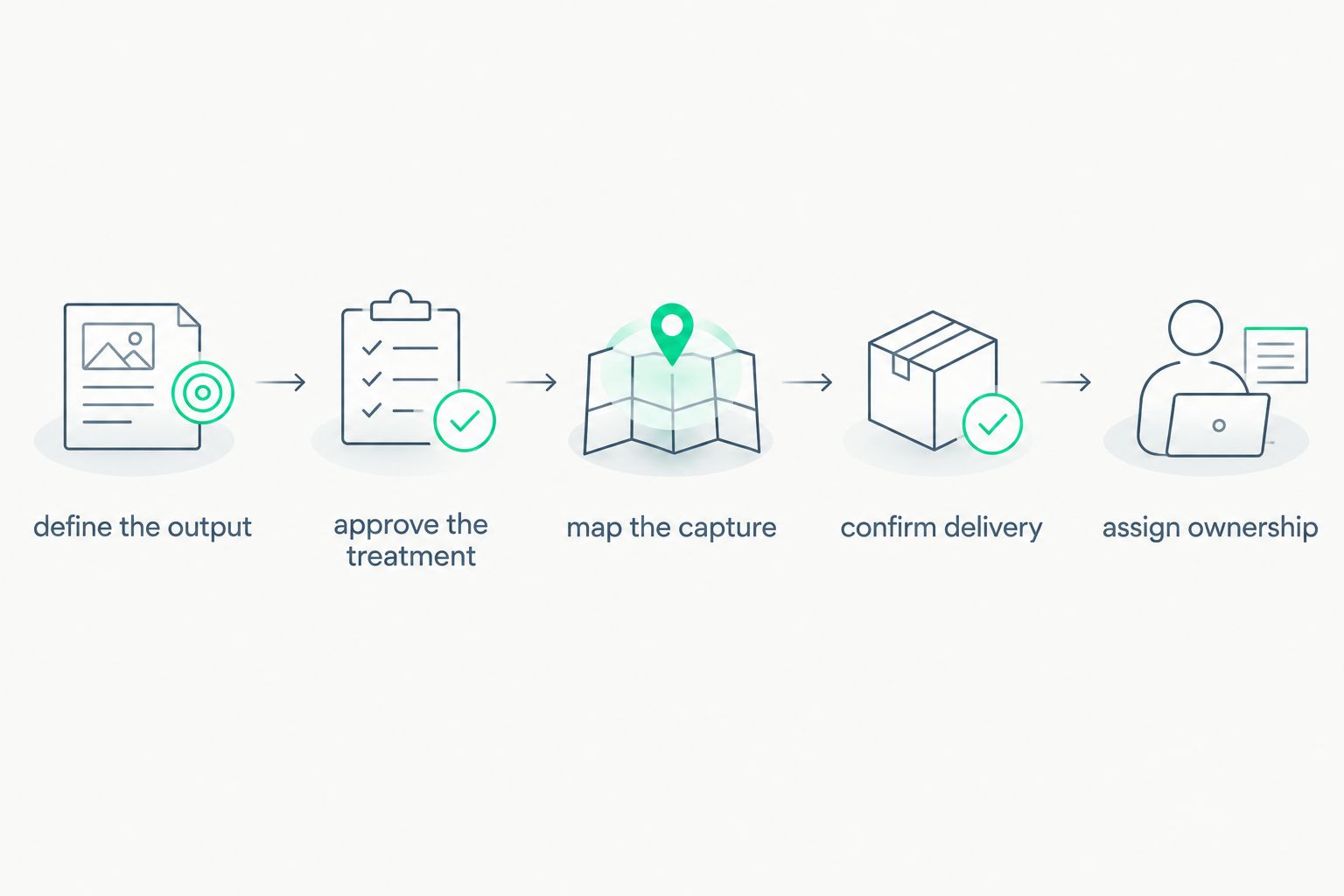
Approve the intended output before deciding how the capture experience works.
Before sign-off, review 2 delivery paths: the normal guest journey and the exception path when an output is rejected or delivery fails. Ask who makes the decision in each case.
For a photo booth rental los angeles brief or a photo booth nyc activation, include the actual venue and production requirements. A city keyword is not a specification. Access arrangements, capture conditions and the event schedule belong in the request; supplier coverage must be confirmed directly.
Send the approved requirements through the quote request. Keep the creative reference and operating needs together so the response addresses the experience you intend to produce.
how these options rank
The order follows the criteria above: brand fidelity, guest likeness, delivery fit, production fit, approval control and content rights. It is a use-case ranking, not a performance score or a claim of hands-on testing.
Branded instant capture takes the default position because it directly answers a branded-content brief. Background replacement takes the setting-led slot. Portrait styling takes the illustration-led slot. Post-event editing takes the approval-led slot.
For 2026 supplier comparisons, use 1 approved reference treatment across proposals. Comparing unrelated demonstrations tells you which demo you prefer, not which proposal meets the brief.
which ai photo booth approach should you choose?
Choose branded instant capture when your priority is branded content guests receive at the event. Add a generated treatment only when that treatment is essential to the campaign idea.
Choose background replacement for a setting-led concept. Choose portrait styling for an illustration-led takeaway. Choose post-event editing when release approval matters more than immediacy.
Your default should be the least complicated workflow that delivers the approved creative. More transformation is not automatically a better activation.
FAQ
what's the best ai photo booth for a branded event?
The best approach depends on the required output: branded instant capture, background replacement, portrait styling or reviewed post-event editing. Hypno is best for brands and agencies prioritizing branded photo and video capture with instant delivery; specify generated effects separately.
is an ai photo booth the same as a branded photo booth?
No. A branded photo booth applies campaign branding to the capture experience or output, while an ai photo booth brief can require generated or transformed imagery. Define the exact output rather than relying on the label.
should an agency choose background replacement or portrait styling?
Choose background replacement when the campaign depends on the setting, and portrait styling when it depends on changing the visual treatment of the person. Approve examples against the intended guest takeaway.
can an ai photo booth deliver images instantly?
Instant delivery must be confirmed for the specific workflow. Ask whether the proposed process includes generation, review and guest delivery, or whether any of those steps happen later.
what should a photo booth rental los angeles brief include?
Include the venue, event schedule, approved output, branding requirements and delivery expectations. Confirm service coverage and production responsibilities directly with the supplier rather than assuming them from a city search.
what should agencies ask before booking a photo booth nyc activation?
Ask how the proposed capture experience fits the venue, guest journey and campaign approvals. Separate confirmed requirements from optional treatments, and establish who handles onsite exceptions.
how should brands approve an ai photo booth in 2026?
Approve the finished output and operating workflow separately. Review representative examples, define unacceptable results and confirm consent, delivery and approval responsibilities before the event.
one last thing
Approve the failure response alongside the creative. An attractive sample tells you what success looks like; an agreed exception process tells the onsite team what to do when a result does not meet the brief.
For your 2026 activation, write down who can reject an output and what the guest receives instead. That decision belongs before doors open, not in a live production discussion.
related guides