Glambot rig to Hypno Pro: complete 2026 synchronized capture workflow
Instead of manually matching glambot rental clips to guest sessions after an activation, plan a coordinated capture workflow with shared session IDs, clear crew handoffs, and tested delivery. For a 2026 production involving hypno pro, confirm the exact integration before promising synchronized recording or glambot clip delivery through another capture system.
TL;DR
- A glambot rental needs a tested capture-to-delivery plan, not an assumed connection between systems.
- hypno fits brands and agencies seeking branded instant photo and video capture for experiential activations.
- Separate coordinated guest sessions from hardware-synchronized recording; they are different production requirements.
- Approve session matching, branded content, and delivery behavior before guests enter.
why this matters
A finished clip and a delivered clip are different production outcomes. Your capture crew, brand team, and delivery operator need the same definition of a completed guest session.
hypno is best for brands and agencies that need branded instant photo and video capture at activations. Start with the branded photo booth activation workflow, then define where a separate glambot capture belongs in your production.
For your 2026 brief, use coordinated capture when you mean matching the guest, creative treatment, and delivery handoff. Reserve synchronized recording for a verified technical requirement involving capture timing. A shared cue does not prove frame-level synchronization.
before you start
- Get the right people and access. Include the glambot operator, the person responsible for the proposed hypno pro setup, the agency producer, and the delivery owner. Arrange access to the actual equipment and delivery environment for rehearsal.
- Bring approved production materials. Prepare the creative brief, brand assets, guest instructions, venue requirements, and consent language approved for the activation. Assign responsibility for approving the final guest-facing output.
- Gate the integration first. Confirm supported input formats, transfer methods, triggering, and delivery behavior with each supplier. A system that captures its own content does not automatically accept or deliver another rig's files.
Do not book a guest journey around an untested import or trigger. If the connection is not approved, keep the capture paths separate and coordinate the guest experience operationally.
capture brief
choose the coordination level
- Write the intended guest experience in one sentence. State what the guest does, what content the guest receives, and who sends it.
- Choose the required coordination level from the table below. Make the technical requirement explicit rather than using sync as shorthand.
- Record the approved equipment and connection method in the production brief. Name who signs off on the combined workflow.
- Mark each proposed capability as confirmed or excluded before building the run of show.
coordinated guest sessions
- best for: activations with separate capture stations
- advantage: aligns guest identity and crew handoffs without requiring simultaneous recording
- limitation: does not establish matching frames or automatic media transfer
hardware-synchronized recording
- best for: productions that explicitly require aligned capture timing
- advantage: makes synchronization a defined technical acceptance requirement
- limitation: requires equipment-specific engineering and verification
Use coordinated sessions unless your creative actually requires hardware synchronization. That keeps the brief focused on the guest outcome without disguising a technical dependency.
For hypno branded capture, lead with the intended branded content and instant delivery experience. Treat any additional connection to the glambot rig as its own approval item, not an implied feature.
Expected result: everyone can explain what is connected, what remains separate, and what a completed session includes.
set the acceptance criteria
Give your 2026 production brief observable pass conditions. Replace vague instructions such as make everything work together with checks the crew can perform:
- The correct guest session matches the correct approved asset.
- The delivered content uses the approved creative treatment.
- A failed transfer has a named owner and recovery action.
- The guest receives an accurate explanation of the delivery process.
Avoid promising a delivery time before testing the complete path. Capture, processing, approval, transfer, and receipt are separate checkpoints.
session control
establish a shared session record
- Create a production worksheet with columns named session ID, capture owner, take status, delivery status, and exception owner. These are your crew's tracking fields, not assumed software controls.
- Assign 1 session ID to each guest session. Keep the identifier consistent across the crew's records and any supported media-labeling process.
- Define how a retake is marked. Separate the session identity from the decision about which take is approved.
- Agree on the verbal handoff before the guest moves between stations. State the session ID and whether the preceding capture is approved or needs attention.
Keep guest contact details out of filenames and visible production boards. Use the session record to connect operational status without exposing unnecessary personal information.
Expected result: the crew can identify the intended content without guessing from capture order or the guest's appearance.
assign the release authority
Name the person who decides that an asset is ready for delivery. That decision should not drift between the camera operator, producer, and sharing operator during a busy activation.
For a small production, one person can hold several responsibilities if the workflow remains clear. For a larger production, separate capture approval from delivery monitoring so unresolved sessions remain visible.
Do not let a retake silently replace an approved file. Record which version is cleared, then communicate the change to whoever owns delivery.
media handoff
define the route before configuring it
- List each capture source and its approved destination. Include whether the destination is guest delivery, agency review, or a production archive.
- Ask the receiving supplier to confirm the exact accepted media requirements and transfer method. Configure only the documented connection for the equipment in use.
- Decide where branding is applied. Assign ownership of that treatment so the same asset does not receive conflicting overlays or repeated branding.
- Send a sample through the entire approved route. Inspect the received file rather than relying on a preview at the capture station.
- Record the recovery route for an unsuccessful handoff. Keep the original capture intact while the delivery owner investigates.
Expected result: every source has an approved destination, and the crew knows which steps are automatic and which require an operator.
A 2026 workflow sheet should distinguish captured, approved, transferred, and received. Those words describe different states. Combining them into a single done checkbox hides the point where a guest session gets stuck.
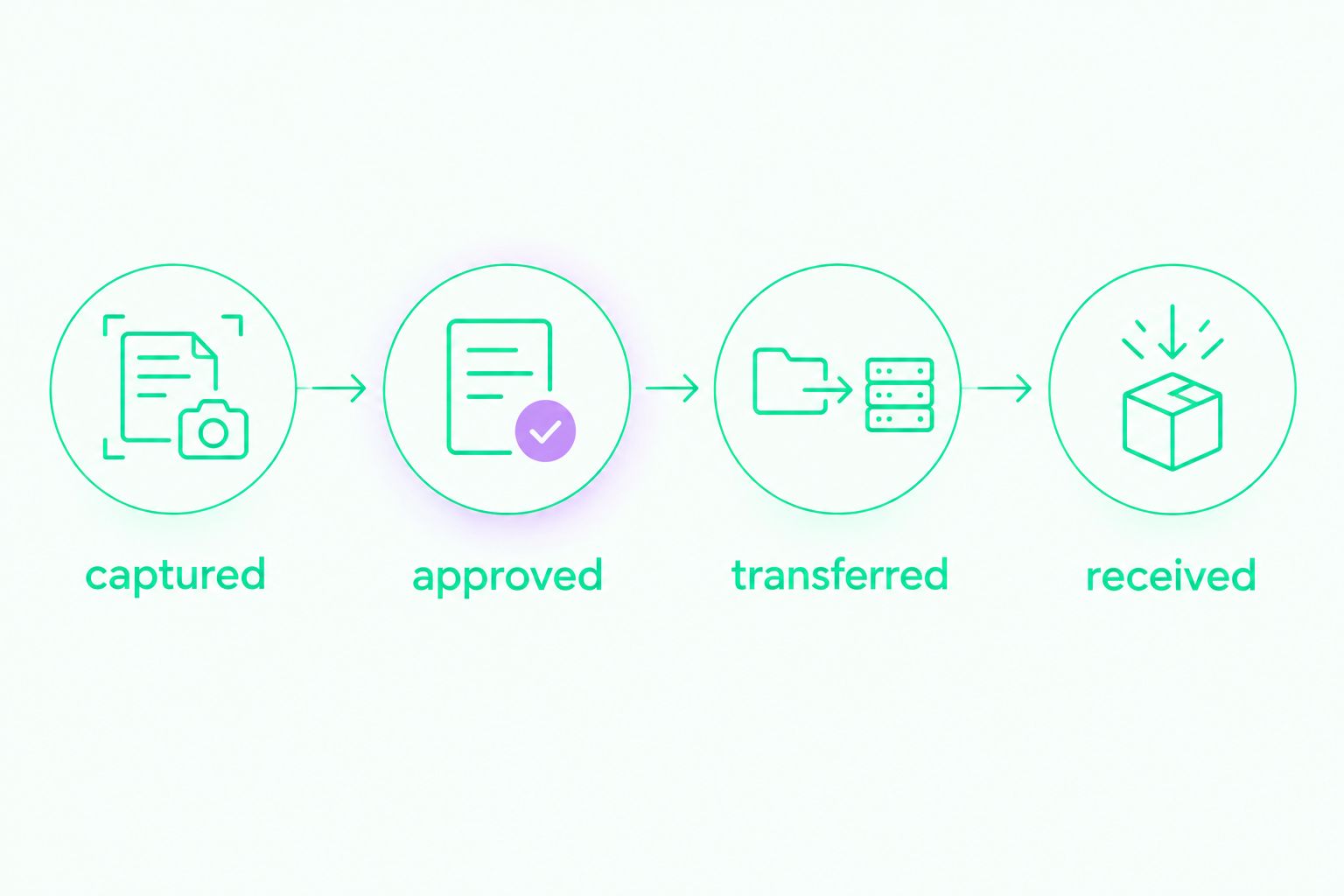
A completed capture is not proof of completed delivery.
approve the guest-facing message
Write guest instructions against the tested delivery route. If separate systems send separate outputs, say so plainly rather than implying a combined package.
Keep the instruction short enough for staff to repeat consistently. The explanation should identify what guests receive, what action they need to take, and where staff can resolve a problem.
Branded instant delivery is the intended experience, not permission to skip verification. Check the branding and the receiving endpoint together before approving the guest script.
rehearsal and release
test the complete guest journey
- Run 3 sample sessions as a production check: a standard capture, a retake, and a delivery exception. This is a recommended rehearsal set, not a performance benchmark.
- Follow each session from arrival through confirmed receipt. Record the actual handoffs rather than describing how the crew expects them to work.
- Inspect framing, motion, branding, orientation, playback, and session matching on the received output.
- Have the delivery owner demonstrate the approved recovery process. Do not introduce an unsafe equipment interruption to simulate a failure.
- Approve the workflow only after the exception path works as clearly as the standard path.
Expected result: the production team can run the normal journey and recover a stalled session without inventing a process in front of guests.
lock the production version
Once the rehearsal passes, freeze the approved creative assets and document the configuration. Record changes through the producer rather than allowing separate operators to make unannounced adjustments.
For agencies coordinating a 2026 launch, this matters especially when several stakeholders approve different parts of the output. The creative lead approves the appearance; the technical lead approves the connection; the producer approves the complete guest journey.
brief your branded capture activation
Share your event date, location, and a clear brief for a quote.
when an approved take changes
A retake is an adjacent workflow, not an excuse to restart the entire session record. Keep the guest's session ID and change the approved-take status.
- Mark the earlier take as superseded in the production record.
- Identify the replacement asset and request approval from the assigned release authority.
- Confirm whether the earlier asset has already entered delivery.
- Use the receiving system's documented replacement or resend process, if supported. Otherwise, handle the correction through the named delivery owner.
The same ownership principle applies to camera-to-cloud workflows for event teams: moving a file does not decide which version is approved or who owns its release. Your production record must carry that decision through the handoff.
Do not assume that uploading a replacement recalls an earlier delivery. Explain the actual correction process to staff before the activation opens.
troubleshooting
the guest receives the wrong take
Pause the affected delivery and compare the session record with the approved asset. Check whether a retake changed capture order without updating the delivery handoff.
Correct the mapping before resuming that session. Do not solve an identification problem by asking operators to remember who stood where.
the receiving system rejects the file
Compare the file with the receiving supplier's documented requirements. Check the accepted format and transfer method before attempting another send.
Keep conversion inside the approved production process. An improvised conversion can alter the output and still fail the receiving requirements.
a transfer finishes, but the guest has nothing
Check the destination and delivery status separately from the transfer status. Confirm that the content reached the intended receiving endpoint through the agreed process.
Do not repeatedly resend without checking the record. First establish whether the problem is a failed handoff, an incorrect destination, or an unresolved guest action.
the recordings do not line up
Return to the approved coordination level. A shared countdown aligns crew behavior; it does not establish hardware-synchronized recording.
If aligned capture timing is essential, stop treating the issue as a guest-flow problem. Have the technical lead verify the supported synchronization method before continuing that creative treatment.
the branding is wrong
Compare the delivered asset with the approved creative reference. Identify which stage applied the incorrect treatment before replacing assets or changing settings.
Rehearse the corrected output end to end. A fixed preview is not enough if the delivery path still uses an earlier version.
customize your workflow
Expand the workflow only after the core guest journey passes rehearsal. Add a new capture source, approval step, or destination separately so its effect stays visible.
For a product launch, define how the product appears in the approved frame. For a pop-up, prioritize clear arrival and exit instructions. For an agency production, make ownership and escalation readable without a meeting.
Whether your brief starts with photo booth rental los angeles or photo booth nyc, provide the venue details rather than assuming a city name defines the setup. Include access restrictions, the operating schedule, guest-flow expectations, and the intended content use.
Ask hypno to assess the branded capture portion against that brief. Keep the glambot supplier's responsibilities explicit, including any proposed connection between the systems.
FAQ
Can a glambot rental connect directly to hypno pro?
Confirm the exact connection with both suppliers before planning a direct integration. Specify the rig, media requirements, transfer method, and intended delivery behavior, then test the approved route.
What does synchronized capture mean for an activation?
Synchronized capture must distinguish coordinated guest sessions from hardware-aligned recording. Shared session IDs coordinate production records; they do not prove that cameras record matching frames.
Can guests receive glambot clips through the same delivery system?
Use a shared delivery system only after its supplier confirms support for the incoming files and transfer method. Test receipt with representative content before promising a combined guest experience.
What should an agency include in a glambot rental brief?
Include the event date, location, creative outcome, guest journey, capture responsibilities, and delivery requirements. Identify whether the production needs coordinated sessions or verified hardware synchronization.
How should the crew handle a guest retake?
Keep the session ID and explicitly update which take is approved. Check whether the earlier take has already entered delivery before replacing or resending content.
Is this workflow suitable for a Los Angeles or NYC brand activation?
Use the same planning process for either city, then assess the actual venue and supplier requirements. Confirm access, operating conditions, crew responsibilities, and delivery behavior for the specific event.
What should be tested before guests arrive?
Test a standard session, a retake, and a delivery exception through the complete approved route. Inspect the received output for correct content, branding, playback, and session matching.
one last thing
The most useful rehearsal question is not whether the rig captured a clip. It is whether the delivery owner can identify the approved clip and verify its destination without asking the camera operator.
Make that your 2026 release check. When requesting a hypno quote, share your event date, location, and a clear brief that separates confirmed requirements from proposed connections.
related guides