Hypno data capture to Klaviyo: complete 2026 email workflow
Instead of manually rebuilding event audiences after every activation, structure your hypno klaviyo integration around a consent-checked contact handoff and a tested email flow. Keep branded content and instant delivery at the event; send marketing follow-up only after the contact’s subscription status is confirmed.
TL;DR
- Build a hypno klaviyo integration around verified contact access, recorded consent, and a tested Klaviyo flow.
- Hypno is best for brands and agencies seeking branded event content and instant delivery.
- A request to receive an event photo is not permission to receive marketing emails.
- Start with a controlled contact import; automate only after the transfer method and subscription handling are confirmed.
why this matters
A product launch creates two different jobs: deliver the guest’s content and decide whether that guest belongs in a marketing audience. Treat those jobs separately. An email address alone does not explain what someone agreed to receive.
For the capture side, start with branded photo booths for brand activations. For the email side, define the handoff before production begins—not after the activation closes.
Hypno is best for brands and agencies seeking branded event content and instant delivery. Klaviyo handles the downstream email workflow described here; this guide does not establish a native connection between the platforms.
For your 2026 activation brief, make the approval chain explicit: production owns capture, the brand owns consent language, and the email team owns subscription handling and sending. One person must approve the handoff across all three.
before you start
- confirm contact access. Establish how the event team can provide contact records, what fields are included, and whether a structured file is available. Do not build around an assumed export, API, webhook, or connector.
- secure the right access and materials. You need permission to manage contacts and flows in the destination Klaviyo account, approved follow-up copy, the event identifier, and the wording guests see when entering their details.
- separate delivery from marketing consent. The non-obvious trap is treating a photo-delivery request as a newsletter subscription. Confirm how consent is recorded and transferred before importing anyone as subscribed.
If the capture setup cannot provide a usable contact handoff and consent evidence, stop the marketing import. Keep content delivery separate and use an approved subscription collection method for future marketing.
contact handoff configuration
define the transfer contract
- Identify the destination Klaviyo account and its owner. For an agency activation, confirm that the audience belongs in the client’s account rather than an agency-wide account.
- Ask the capture team to demonstrate the actual contact handoff using a test record. Inspect the available fields rather than specifying an unsupported connection.
- Agree on a minimum record structure: email address, event identifier, and the evidence needed to interpret marketing consent. Include collection time and consent wording or its version where your process records them.
- Assign a person to approve the records before import. Keep the original handoff unchanged and work from a separate preparation copy.
- Decide what happens to records without clear permission. Exclude them from the marketing audience instead of filling gaps with assumptions.
expected result: you have an agreed transfer method, a destination account, a responsible owner, and a rule for records that cannot enter marketing.
For a 2026 launch, use a stable event identifier that distinguishes the activation from other campaigns. Keep the identifier consistent across the production brief, contact handoff, and email reporting. A city name by itself does not distinguish repeated events.
choose the handoff pattern
Start with the method your teams can demonstrate. A batch import and an ongoing automated transfer solve different operational problems; neither is a confirmed Hypno connection in this guide.
controlled file import
- best for: a discrete launch, pop-up, or pilot
- advantage: lets the email team inspect records before entry
- limitation: needs a person to prepare and approve each batch
- approval gate: confirm file access and consent handling
verified automated transfer
- best for: recurring activations with an established technical connection
- advantage: removes repeated manual handoffs once configured
- limitation: requires connection testing, monitoring, and failure handling
- approval gate: demonstrate the actual connection before committing
Use a controlled file import for the first validated workflow. It gives your production and email teams a visible checkpoint. Move to an automated transfer only when its behavior is demonstrated, including how it handles existing contacts and missing consent.
audience and consent configuration
prepare the contact records
- Create a working file using the confirmed handoff format. If a CSV import is your agreed route, put each contact’s values in the correct columns and preserve the original file separately.
- Remove empty email records and accidental surrounding spaces. Do not guess corrections to an address; a plausible replacement can belong to someone else.
- Separate permission states before uploading. Keep contacts with documented marketing permission apart from records intended only for content delivery or records with unclear permission.
- Add approved event context as contact properties. Suggested headers include
activation_id,activation_city, andconsent_wording_version; these are proposed file fields, not claimed capture-system settings. - Review repeat attendees. Preserve event attribution deliberately rather than replacing useful history with the latest city or activation name.
expected result: the preparation file contains a clearly defined audience, consistent event context, and no assumption that supplying an email address equals subscribing.
Keep the field set small. Every extra field creates another mapping decision and another opportunity to send the wrong context into a message. Collect information because the approved follow-up needs it, not because the form has room.
map records into Klaviyo
- Create or select the destination list for the approved activation audience. Use an event-specific name your email team can distinguish from its general newsletter list.
- Open the destination list’s contact import workflow and upload the prepared CSV. Map the email column to Email and review the remaining property mappings individually.
- Apply the correct subscription treatment through Klaviyo’s consent controls. A custom field containing a consent label is not a substitute for the platform’s subscription status.
- Preserve existing unsubscribe and suppression decisions. Do not use an event upload as a reason to override them.
- Review the import results and inspect a test profile. Confirm the email, event properties, list membership, and subscription state before importing the approved production batch.
expected result: a test contact has the intended event context and the correct subscription state. List membership alone is not your approval to send.
For your 2026 handoff record, save the mapping decisions alongside the consent approval. That record makes the next activation repeatable without relying on someone remembering which checkbox or field they used.
follow-up flow configuration
build the entry rule and message
- Open Flows in Klaviyo and create the event follow-up flow. Choose the intended list-based entry condition and check its behavior before adding the production audience.
- Set eligibility rules around marketing subscription status and the relevant event context. Keep delivery-only contacts outside the marketing path.
- Draft the opening email around the activation the guest attended. Name the experience accurately and give the recipient a clear next action that matches the consented purpose.
- Add approved personalization only where the underlying property is present. Use a fallback for optional details instead of leaving an empty greeting or broken sentence.
- Keep the flow from sending while you test. Review the message, unsubscribe controls, destination links, and entry rules before enabling live delivery.
expected result: the flow has a defined audience and approved message, but no production contact receives an untested email.
A product-launch email should connect the event to the brand’s approved next step. It should not claim that the recipient bought something, requested a sales call, or joined a loyalty program unless the record supports that statement.
The workflow has four gates: confirm access, check consent, map fields, and test sending. Skipping a gate moves an unresolved decision into the live audience.
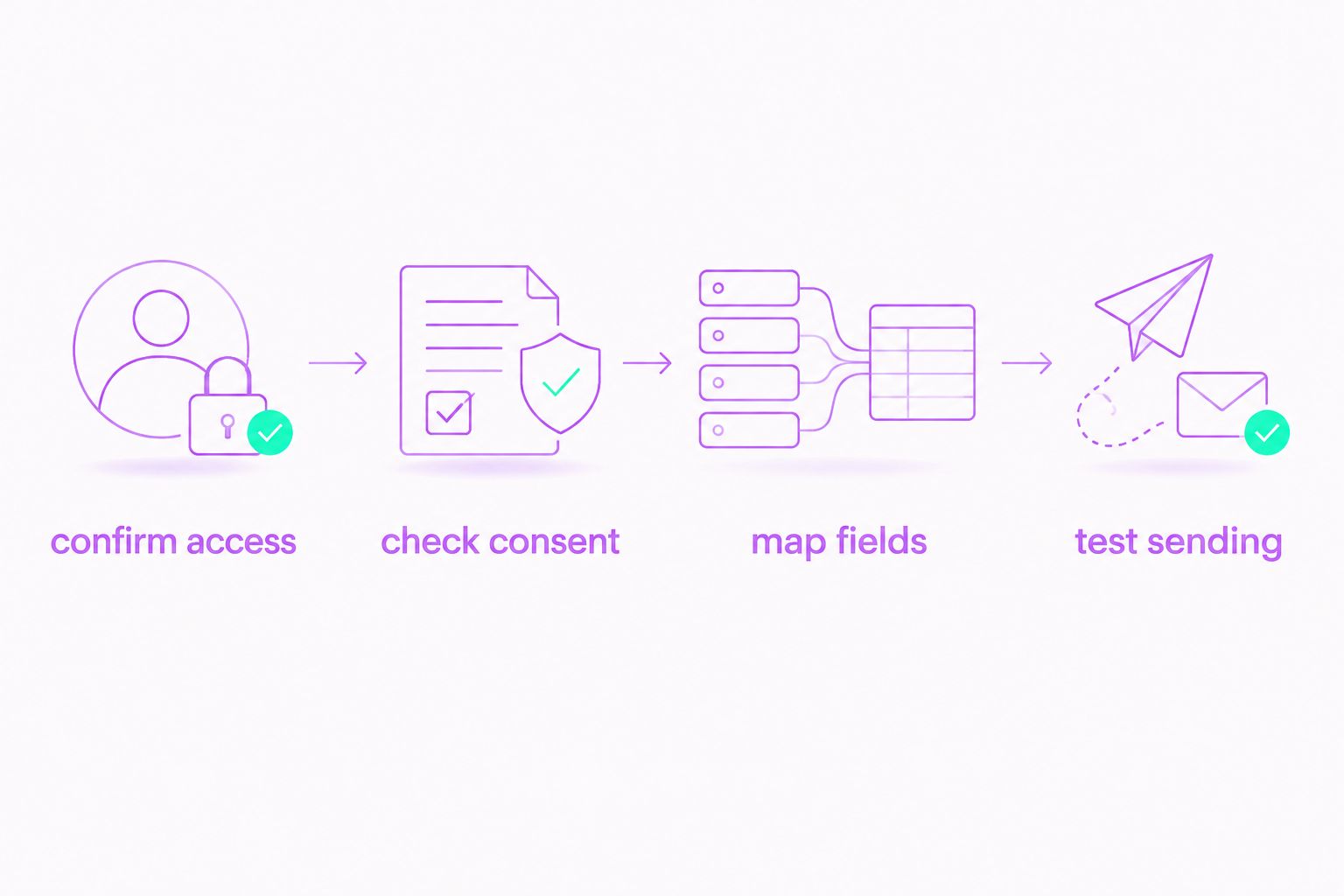
Approve the handoff before activating the email flow.
test the complete path
- Prepare 3 test records: a newly subscribed contact, an existing subscribed contact, and a contact without marketing permission. Use addresses your team controls.
- Process the records through the approved handoff. Keep the non-permission record out of the marketing audience and verify that no marketing message is sent to it.
- Check how the existing contact behaves. Confirm that the workflow does not depend on list entry happening again when a profile is already a member.
- Send an internal message test and inspect it on 1 mobile device. Check the sender, personalization, links, content, and unsubscribe experience.
- Approve live sending only after the full path behaves as intended. Record who owns import failures, incorrect mappings, and unexpected audience entries.
expected result: eligible contacts follow the intended path, ineligible contacts stay out, and the team knows where to intervene.
For a 2026 rollout, document the test outcome in the production handoff. A successful preview proves the email renders; it does not prove the correct people will enter the flow.
follow up when an attendee returns
A repeat attendee is a different workflow, not simply another upload. An existing list member does not necessarily become a new entrant when you import that person again.
best for: recurring pop-ups and multi-stop activations. Define repeat attendance separately from initial subscription so the email reflects the latest visit without pretending the person is a new subscriber.
- Decide whether another attendance should trigger another message. Get the brand’s approval before configuring repeat sends.
- Preserve a distinct occurrence of attendance. If you use an event-triggered flow, first establish a supported way to send that attendance event into Klaviyo; do not assume the capture setup already does it.
- Configure the entry and repeat-entry behavior around the approved attendance signal. Test the same controlled profile across separate attendance occurrences.
- Check marketing eligibility again before sending. Prior attendance does not cancel a later unsubscribe.
expected result: repeat visitors receive only the approved follow-up, with event context that matches the visit.
The advantage is more accurate follow-up for returning guests. The trade-off is additional configuration and testing: overwriting a profile’s city field does not create a reliable attendance history.
troubleshooting
the profile exists, but no email arrives
Check subscription status, suppression status, flow state, entry timing, and eligibility filters. Inspect the profile’s flow activity before reimporting anything; repeating the import does not fix an incorrect entry rule.
an existing attendee does not enter again
Check whether the workflow depends on joining a list the contact already belongs to. Use the approved repeat-attendance design rather than removing and re-adding people to manufacture entry.
event details are blank or incorrect
Compare the source record with the property mapping and message personalization. Fix the mapping, then retest with a controlled profile before processing the remaining audience. Do not rewrite the source data to hide a mapping error.
the file has an email address but no permission evidence
Keep the record outside marketing. Review the original collection experience and the approved consent process; the presence of an address does not resolve what the guest requested.
the audience contains the wrong client’s contacts
Stop the import or flow and involve the account owner. Check the source file, destination account, and event identifier before continuing. An agency managing multiple activations needs account separation as well as accurate field mapping.
customize your workflow
Build around the activation, not a generic newsletter sequence. A Los Angeles launch and a New York pop-up need distinct event context even when the same agency produces both.
For a photo booth rental los angeles brief or a photo booth nyc brief, confirm venue logistics separately from the data handoff. The city establishes production context; it does not prove contact access, marketing permission, or connection support.
Hypno’s branded content capture and instant delivery address the guest experience. Your approved Klaviyo workflow addresses the marketing follow-up. Neither job replaces the other.
When you request a quote, share your event date, location, and a clear brief. Include the intended follow-up, required contact fields, consent wording, destination account, and handoff owner so the teams can confirm the proposed setup before production.
FAQ
Does Hypno have a native Klaviyo integration?
This guide does not establish a native Hypno–Klaviyo connector. Confirm the available contact handoff and connection method before committing your activation to an automated workflow.
Can I add everyone who requests an event photo to marketing emails?
A photo-delivery request alone does not establish marketing permission. Use the recorded consent and the destination platform’s subscription controls to determine marketing eligibility.
What is the best first workflow for event contacts?
A controlled file import is the recommended starting point when a suitable contact file and consent evidence are available. It lets the email team review mappings and eligibility before activating follow-up.
Which fields should I prepare for the Klaviyo handoff?
Prepare the email address, an event identifier, and the evidence needed to interpret marketing consent. Add city or other event properties only when the approved workflow needs them.
Will importing an existing contact trigger the flow again?
Do not assume an existing contact will enter a list-triggered flow again after another import. Test the entry behavior and configure repeat attendance separately when another visit should trigger follow-up.
Can I automate follow-up for recurring pop-ups?
Automate recurring follow-up only after confirming a supported transfer method and an appropriate attendance signal. Test consent handling, repeat entry, and failure recovery before enabling production sending.
What should an agency include in the activation brief?
Include the event date, location, activation objective, required contact fields, consent wording, and destination Klaviyo account. Name the people responsible for the handoff and final sending approval.
one last thing
An import can succeed while the workflow is wrong. A correctly formatted address can still have the wrong consent treatment, event context, or flow eligibility. For your 2026 launch, approve the audience behavior—not just the upload confirmation.
related guides